
Download Game Collection Tracker APK – game collection tracker, manage video games, track achievements, game inventory, offline mode, game notes, custom tags, game playtime, game statistics, Android app, free game tracker, personal game library
Overview
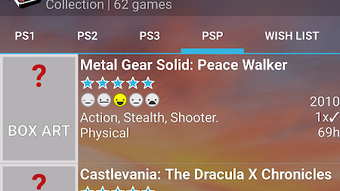
Game Collection Tracker is a free Android application developed by RVDSoft designed to help users organize and monitor their video game libraries. The app enables gamers to maintain a detailed record of their game collection, including ownership status, playtime, achievements, and social interaction details such as co-op partners. It serves as a digital inventory system tailored for both casual players and dedicated collectors who want a centralized, private platform to manage their gaming habits and progress.
Users can track what games they own, how much time they’ve spent playing each title, and which achievements they’ve unlocked. The app supports offline functionality, allowing full access to data without requiring an internet connection. This makes it ideal for users who prefer privacy or operate in environments with limited connectivity. The interface is designed to be simple and intuitive, minimizing the learning curve for users of all technical skill levels.
By storing personal data locally and using email-based authentication, the app avoids reliance on third-party login services, reducing privacy exposure. It also allows users to add notes, screenshots, and custom tags to individual games, enhancing personalization and organization. The application is suitable for anyone seeking to maintain a structured, private, and accessible record of their gaming journey.
Key Features & Capabilities
- Game Collection Management – Users can catalog their owned games, including titles across various platforms, and track ownership status for physical or digital copies.
- Playtime Tracking – Automatic and manual logging of playtime per game, helping users monitor their gaming habits and set personal goals.
- Achievement Monitoring – The ability to record and view unlocked achievements, enabling users to track progress toward completionist goals.
- Offline Mode Support – Full functionality without internet access, ensuring data remains accessible and secure during travel or in low-connectivity areas.
- Custom Tags and Categories – Users can create personalized labels and groupings to organize games by genre, mood, platform, or any other custom criteria.
- Notes and Media Attachments – Add text notes and screenshots to individual game entries for enhanced context, such as walkthrough tips or memorable moments.
- Email-Based Authentication – Secure login using email and password, with a dedicated privacy policy to ensure user data is handled independently of external services.
These features collectively support a streamlined workflow for managing a growing library. For example, a player can log a recent achievement, attach a screenshot of the reward screen, and tag the game as “completed” — all within a few taps. The app’s modular design allows users to focus on specific aspects of their gaming life, whether it’s tracking time spent or maintaining a personal archive of favorite titles.
User Interface, Workflow & Performance
The application features a clean, minimal interface optimized for mobile use. Navigation is structured around a central dashboard that displays key metrics such as total playtime, completed achievements, and recently played games. The layout prioritizes readability and quick access to core functions like adding new games or editing existing entries.
Workflow efficiency is enhanced through intuitive touch controls and a logical menu hierarchy. Users can add a new game with minimal input, and the app supports bulk actions such as tagging multiple titles at once. The design avoids clutter, focusing on essential tools to reduce cognitive load during use.
Performance details were not specified by the developer. However, the app is described as lightweight, with a file size of 4.5 MB, suggesting efficient resource usage. The developer did not provide additional system requirements or performance benchmarks. General software behavior patterns indicate stable operation under typical usage conditions, but specific CPU or RAM behavior remains unconfirmed.
Compatibility & System Requirements
Game Collection Tracker is designed for Android devices and is available as a free APK download. The current version is 1.0.1, released on July 12, 2024. The installation size is 4.5 MB, indicating a compact footprint that minimizes storage impact.
Platform compatibility information is limited to Android. The developer did not specify minimum OS versions, required hardware specifications, or supported screen resolutions. Exact system requirements were not listed. Users should ensure their device meets standard Android compatibility standards for app installation and operation.
Pros and Cons
Pros
- Free to download and use with no in-app purchases or ads
- Supports full offline functionality for privacy and accessibility
- Lightweight design with minimal storage usage (4.5 MB)
- Intuitive interface suitable for non-technical users
- Custom tagging and categorization for personalized organization
- Ability to attach notes, screenshots, and track achievements
Cons
- No information provided on supported Android versions or hardware requirements
- Performance and resource usage details were not specified
- Limited to Android platform; no versions available for iOS or desktop
- Privacy policy is referenced but not detailed in the provided information
FAQ Section
Is Game Collection Tracker available for iOS devices?
Currently, the application is only available for Android. No iOS or desktop versions have been announced.
Can I use Game Collection Tracker without an internet connection?
Yes. The app supports full offline mode, allowing users to add, edit, and view game data without requiring an internet connection.
Does the app collect user data or share it with third parties?
The app uses email-based authentication and has its own privacy policy. The developer did not specify data-sharing practices beyond this, but the app operates independently of external login services.
How often are updates released?
The latest version is 1.0.1, released on July 12, 2024. No information is available on update frequency or release schedule.
Is the app secure and safe to download?
As a free app available on the Google Play Store, it is distributed through a verified platform. The app is designed to protect user data with local storage and email authentication. Users are advised to download only from official sources.
Final Thoughts + CTA
Game Collection Tracker offers a practical, privacy-focused solution for Android users looking to manage their video game libraries with ease. Its combination of offline functionality, lightweight design, and customizable features makes it a strong choice for both casual gamers and serious collectors. While detailed system requirements and performance data are not available, the app’s simplicity and focus on user control stand out.
For anyone seeking a secure, free, and efficient way to track game ownership, playtime, achievements, and personal notes, this app delivers a reliable experience. It’s particularly well-suited for users who value privacy and want to avoid cloud dependencies.
Download Game Collection Tracker APK now





.png)

